
Articles
FFMPEG with NVIDIA Acceleration on Ubuntu 16.04
13/09/2017
6,205 Hits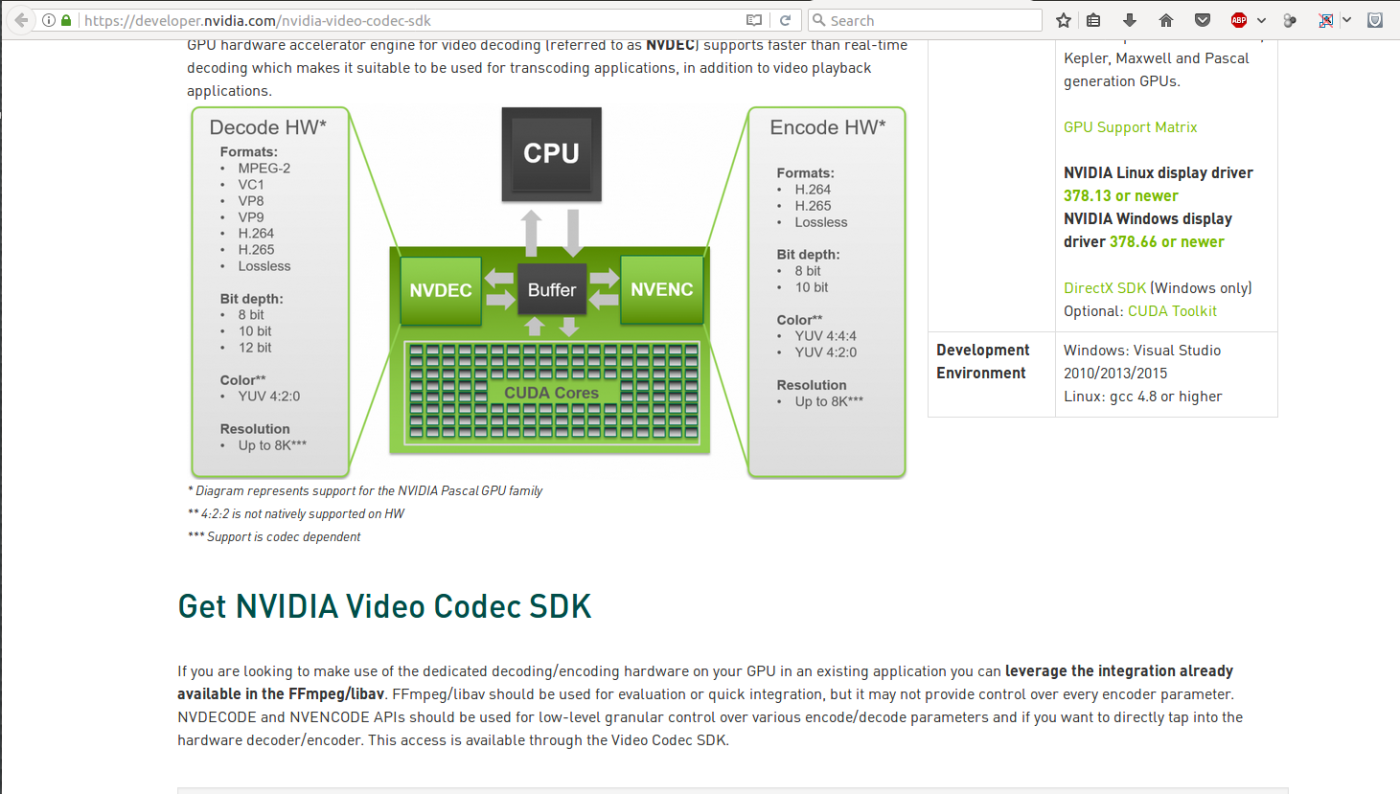
Setup of Custom FFMPEG with Acceleration of GPU
The Video Codec SDK includes a complete set of high-performance tools, samples and documentation for hardware accelerated video encode and decode on Windows and Linux.
The SDK consists of two hardware acceleration interfaces:
- NVENCODE API for video encode acceleration
- NVDECODE API for video decode acceleration (formerly called NVCUVID API)
NVIDIA GPUs contain one or more hardware-based decoder and encoder(s) (separate from the CUDA cores) which provides fully-accelerated hardware-based video decoding and encoding for several popular codecs. With decoding/encoding offloaded, the graphics engine and the CPU are free for other operations.
GPU hardware accelerator engine for video decoding (referred to as NVDEC) supports faster than real-time decoding which makes it suitable to be used for transcoding applications, in addition to video playback applications.
The following code will remove ffmpeg and related packages:
sudo apt-get -y remove ffmpeg x264 libx264-dev

Follow the steps provided in following document: FFMPEG-with-NVIDIA-Acceleration-on-Ubuntu_UG_v01.pdf
Install the build infrastructure packages
sudo apt-get install build-essential git yasm nasm unzip wget sysstat
Copy the NVENC SDK that you downloaded from above side to ~/Development
mkdir Development
cd Development
cp Video_Codec_SDK_8.0.14.zip Development/ (or copy paste though GUI)
unzip Video_Codec_SDK_8.0.14.zip
Copy the NVENC headers to /usr/local/include to make it easier later
sudo cp Video_Codec_SDK_8.0.14/Samples/common/inc/*.h /usr/local/include
CUDA UTILITY
Download and install a light-weight library to communicate with the CUDA display driver.
~/Development/ $ wget http://developer.download.nvidia.com/compute/redist/ffmpeg/1511-patch/cudautils.zip
Copy the CUDA utility to ~/Development/.
~/Development/ $ unzip cudautils.zip
~/Development/cudautils/ $ cd cudautils
Build the CUDA utility.
~/Development/cudautils/ $ make
~/Development/cudautils/ $ cd ..
~/Development/ $
OPEN SOURCE LIBRARIES
Get x264
~/Development $ git clone git://git.videolan.org/x264.git
~/Development $ cd x264
Configure x264
~/Development/x264 $ ./configure \
--disable-cli \
--enable-static \
--enable-shared \
--enable-strip
Build x264.
~/Development/x264 $ make -j 4
Install x264.
~/Development/x264 $ sudo make install
~/Development/x264 $ sudo ldconfig
~/Development/x264 $ cd ..
~/Development/ $
BUILD IT ALL TOGETHER
Get FFmpeg.
~/Development/ $ git clone git://source.ffmpeg.org/ffmpeg.git
Download the NVIDIA acceleration.
~/Development/ $ wget http://developer.download.nvidia.com/compute/redist/ffmpeg/1511-patch/ffmpeg_NVIDIA_gpu_acceleration.patch
~/Development/ $ cd ffmpeg
Apply the NVIDIA acceleration patch. Note that this patch was created against the
git master commit:
commit b83c849e8797fbb972ebd7f2919e0f085061f37f
~/Development/ffmpeg $ git reset --hard b83c849e8797fbb972ebd7f2919e0f085061f37f
~/Development/ffmpeg $ git apply ../ffmpeg_NVIDIA_gpu_acceleration.patch
Configure FFmpeg with NVENC, NVRESIZE and x264 support.
~/Development/ffmpeg $ cd ..
~/Development/ $ mkdir ffmpeg_build
~/Development/ $ cd ffmpeg_build
~/Development/ffmpeg_build $ ../ffmpeg/configure --enable-nonfree \
--enable-nvenc \
--enable-nvresize \
--extra-cflags=-I../cudautils \
--extra-ldflags=-L../cudautils \
--enable-gpl \
--enable-libx264
Build FFmpeg.
~/Development/ffmpeg_build $ make -j 4
Check that FFmpeg works. If NVENC and libx264 built properly you should get
them in this list of encoders. We can filter the list down to h.264 encoders with “grep
264”.
~/Development/ffmpeg_build $ ./ffmpeg -encoders | grep 264
..................................
.....Somethings here..............
V..... libx264 libx264 H.264 / AVC / MPEG-4 AVC / MPEG-4 part 10 (codec h264)
V..... libx264rgb libx264 H.264 / AVC / MPEG-4 AVC / MPEG-4 part 10 RGB (codec h264)
V..... nvenc NVIDIA NVENC h264 encoder (codec h264)
V..... nvenc_h264 NVIDIA NVENC h264 encoder (codec h264)
Check that FFmpeg has the NVRESIZE video filter. We can filter the list down with
“grep nvresize”.
~/Development/ffmpeg_build $ ./ffmpeg -filters | grep nvresize
..................................
.....Somethings here..............
nvresize   V->N GPU accelerated video resizer.
Install FFmpeg.
~/Development/ffmpeg_build $ sudo make install
~/Development/ffmpeg_build $ sudo ldconfig
~/Development/ffmpeg_build $ cd ..
~/Development/ $ cd .. ~/ $
Done!!!